Voice Notes for Mac.
100% Local, 100% Private.
Hold the hotkey, speak, release — your words become a sticky note. Powered by OpenAI Whisper running on the Apple Neural Engine. Audio never leaves your Mac.
macOS 14+ • Apple Silicon & Intel • Voice unlocks with Pro
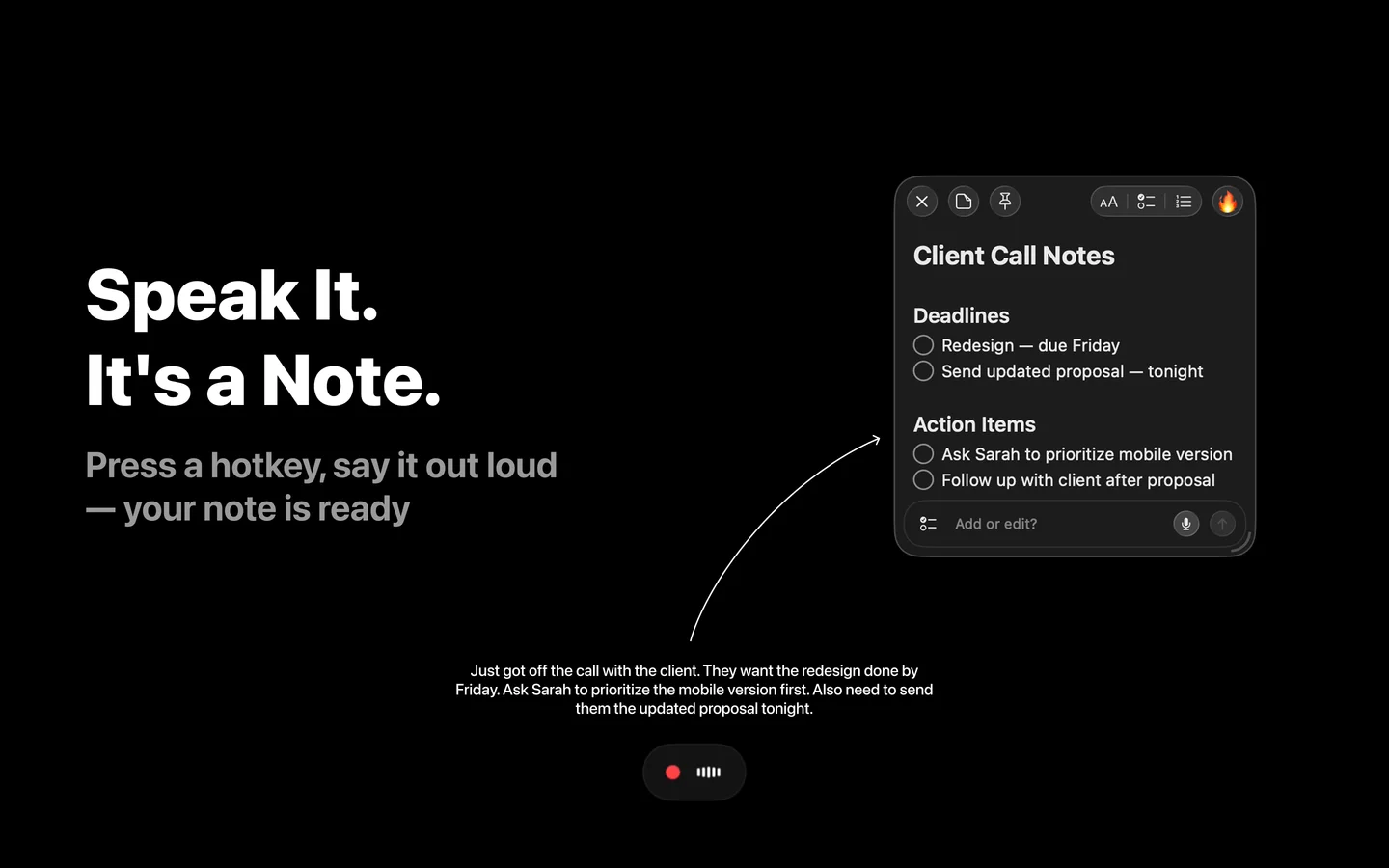
How Voice Notes Work on Mac
Three steps. One fluid motion. No app to open, no recording dialog, no upload.
Hold the Hotkey
Press and hold your customizable Voice Note hotkey from anywhere on macOS — even when SlashNote is in the background. On first use, SlashNote downloads the right Whisper model for your Mac (~80MB to ~1.5GB depending on hardware).
Speak Naturally
Audio is captured at 16 kHz mono PCM. There is no recording length cap for normal use. Speak in any of the supported languages, or let auto-detect pick one.
Release. Note Appears.
Whisper transcribes the audio on-device using the Apple Neural Engine. The audio file is deleted. A new sticky note opens with your transcript, ready to edit, color, or pin.
Powered by Whisper on the Apple Neural Engine
SlashNote runs OpenAI's open-source Whisper speech model fully on-device. Whisper is the same model behind tools like MacWhisper and Superwhisper — but here it runs locally on the Apple Neural Engine, the same silicon Apple Intelligence uses.
On first use, SlashNote picks the best Whisper variant for your Mac and downloads it once. After that, voice notes work fully offline. There is no API key, no quota, no per-minute cost.
- ✓Open-source Whisper model, MIT-licensed
- ✓Apple Neural Engine acceleration on Apple Silicon
- ✓Model auto-selected for your hardware
- ✓No per-request cost, no rate limits
tiny     ~80 MB     fastest, best for clear speech
base     ~150 MB    fast, daily use
small    ~250 MB    balanced speed + accuracy
medium   ~750 MB    high accuracy
large    ~1.5 GB    most accurate, accents & jargon
SlashNote auto-selects the right variant for your Mac. Downloaded once, cached locally, works offline thereafter.
Two Ways to Capture a Voice Note
Pick the entry point that matches what you are doing.
Global Voice Note Hotkey
Push-to-talk from anywhere on macOS. Hold your customizable hotkey, speak, release — a new sticky note opens with your transcript. Works even when SlashNote is hidden in the background.
Customize the hotkey in Settings → Shortcuts → Voice Note. Pro feature.
In-Note Voice Button
Already in an existing note? Tap the microphone in the editor footer to dictate more content into the same note. Same engine, same on-device path — just appended to what you have.
Available inside the SlashNote editor. Pro feature.
Your Audio Never Leaves Your Mac
Local-first by construction, not by policy.
Captured Locally
Audio is recorded at 16 kHz, 16-bit, mono PCM. The microphone is only active while you hold the hotkey.
Transcribed On-Device
Whisper runs on the Apple Neural Engine. No network call, no cloud round-trip, no analytics on what you said.
Audio File Deleted
The temporary audio file is removed immediately after the transcript is produced. Only the text remains.
Works Offline
After the first-use model download, voice notes work without internet. On a plane, in a tunnel, in a faraday cage.
See the full privacy policy or read why privacy-first note-taking matters.
Multilingual Voice-to-Text
The Whisper model supports 100+ languages. SlashNote exposes the 10 most-used in settings, plus auto-detect — which routes to any of the 100+.
Pick a specific language for highest accuracy on uncommon vocabulary, or leave it on auto-detect and switch mid-thought.
Accuracy Tuned to Your Mac
SlashNote auto-selects the best Whisper variant for your hardware. You do not pick a model — your Mac does.
Smaller Macs
Tiny and base variants (~80MB to ~150MB). Fast transcription, good for short captures and clear speech.
Mid-Tier Apple Silicon
Small and medium variants (~250MB to ~750MB). Balanced accuracy and speed for everyday voice notes.
Higher-End Apple Silicon
Large variant (~1.5GB). Top-tier accuracy on accents, technical vocabulary, and long-form speech.
Apple Silicon (M1 and later) recommended — Whisper accelerates on the Apple Neural Engine. Intel Macs run on CPU and are supported on macOS 14+.
Voice Notes vs Siri Dictation vs Cloud Dictation
Same input — three very different paths your audio can take.
| Aspect | SlashNote Voice Notes | Apple Dictation | Cloud Dictation Apps |
|---|---|---|---|
| Processing | 100% on-device (Whisper) | On-device (Apple Silicon) | Cloud servers |
| Internet Required | No (after model download) | Sometimes | Always |
| Output | Structured sticky note | Text into focused field | Text into app of choice |
| Languages (UI selectable) | 10 + auto-detect (model: 100+) | ~40 system languages | Varies by app |
| Audio Retention | Deleted after transcription | Not stored | Provider-dependent |
| Cost | Pro plan, no per-minute fee | Free with macOS | Subscription or per-minute |
| Best For | Quick voice → searchable notes | Dictating into apps | Long meetings, transcripts |
Deeper dive in our blog: on-device vs Siri vs cloud voice — a technical comparison.
Voice Into a Note, Not Just a Text Field
Dedicated dictation apps are great for typing-by-voice. SlashNote is built for capturing thoughts that need to live somewhere.
A Dictation App
Inserts raw transcribed text into whichever field your cursor is in. The output is ephemeral — once you close the document, you have to remember where you put the thought.
- Output: raw text in a focused field
- No structure, no organization
- No search across captures
- No AI on top of what you said
SlashNote
Creates a structured sticky note you can pin over windows, color-code, search, and run AI on. Your MCP server can read it. Claude or Cursor can summarize or restructure it. The thought has a home.
- ✓Output: a real note, persistent and searchable
- ✓Pin over windows, color, organize
- ✓Searchable across every voice capture
- ✓AI modifiers and MCP-accessible
Want the full voice-to-AI workflow? Read the AI voice notes workflow guide.
What People Use Voice Notes For
Different contexts, same gesture: hold, speak, release.
Meeting Recaps
Speak the highlights right after a meeting — names, decisions, next steps. Saved as a sticky you can pin while you write the follow-up.
Walking Brainstorms
Capture ideas on a walk without taking your hands off your coffee. Hold the hotkey, talk, release — the thought is a note.
Journaling
End-of-day reflections in your own voice, transcribed locally. Audio never leaves the Mac; the text stays in your notes.
Code TODOs
Explain a refactor idea out loud while it is fresh, without leaving your editor. The note lands ready to act on next session.
Language Practice
Switch input language in settings or use auto-detect. Speak in any of 100+ languages Whisper supports.
Accessibility
Voice-first capture for anyone who finds typing tiring or impractical — fully on-device, no account required.
Requirements
System
- macOS 14 (Sonoma) or later
- Apple Silicon recommended (M1+)
- Intel Macs supported (CPU transcription)
- ~80MB to ~1.5GB disk for the Whisper model
Plan
- Voice input unlocks with Pro
- Pro Monthly: $9.99/mo
- Pro Yearly: $29.99/yr
- Lifetime: $29.99 one-time
Frequently Asked Questions
Is voice input on Mac private with SlashNote? ▾
Does voice input work offline? ▾
Is voice input free or a Pro feature? ▾
What languages does voice input support? ▾
Do I need Apple Silicon for voice notes? ▾
How accurate is the transcription? ▾
What's the difference between SlashNote and apps like MacWhisper? ▾
Where is the voice model stored on my Mac? ▾
Try Voice Notes for Free
Download SlashNote — free on the Mac App Store. Voice input unlocks with Pro.
Download on the App Store