From thought to note in 1 second
The macOS menu bar app for lightning-fast sticky notes. 6 ways to capture, AI-powered writing assistance, 100% local voice input, and MCP server for developers.
Download on the App StoreFree · macOS 14+ · Apple Silicon & Intel




6 Ways to Create a Note
Drag from Menu Bar
Pull the icon down — a note grows under your cursor with a smooth animation.
Right-click Menu
Classic approach from the menu bar icon. Quick and familiar.
Global Keyboard Shortcut
Customizable hotkey to create a note instantly from anywhere. No mouse needed.
Voice Note
Push-to-talk with customizable hotkey → dictate → text appears in the note. 100% on-device. Pro feature.
Shake Gesture
While dragging files or text from other apps, shake your mouse → content drops into a new note. Pro feature.
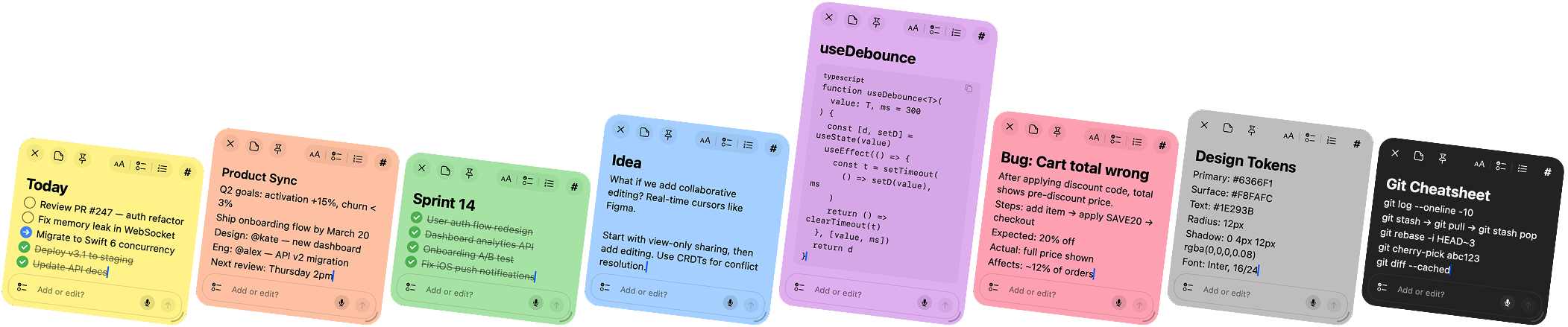
8 Colors to Match Your Flow
Organize notes visually. Each color has meaning — you decide what it is.
AI That Works With Your Notes
6 modifiers to transform your notes. No content generation — only formatting, translation, and grammar fixes.
Format
Add headings, bold key terms, convert lists to checkboxes, wrap code in blocks.
To-Do List
Extract tasks from your text and convert them into checkboxes.
Summary
Compress your note to 2-5 key bullet points. Facts only, no opinions.
Translate
Translate your note to any language. Preserves all formatting.
Fix Writing
Fix spelling, grammar, and punctuation. Meaning and style stay intact.
Simplify
Replace complex words, break long sentences, remove jargon.
/note Cloud (Claude). BYOM: Replicate or Anthropic API key.
MCP Server for AI Agents
Let AI agents read, create, and organize your notes. Works with Claude Desktop, Claude Code, Cursor, VS Code, Windsurf, JetBrains, and Zed.
- ✓ 20 tools — create, read, search, organize, and automate notes
- ✓ 6 prompt templates — pre-built workflows for common AI tasks
- ✓ HTTP Bridge API — REST endpoint for advanced integrations
- ✓ One-line setup — add a single JSON block to your MCP config
# Auto-install for Claude Desktop
curl -fsSL https://slashnote.app/install-mcp.sh | sh

# Or for any HTTP-compatible client (Cursor, VS Code, Windsurf, etc.)
# Add to your MCP config:
{ "type": "http", "url": "http://localhost:51423/mcp" }
Claude Code Plugin
11 slash commands + 4 smart hooks that turn SlashNote into your developer dashboard.
Capture
Instant note creation from terminal. Ideas, tasks, bugs, meetings — one command, zero friction.
Workflow
Automated task execution and search. Task loop runs your checklist while you review.
Reporting
Session summaries, standups, and context handoffs. Never lose track of what you did.
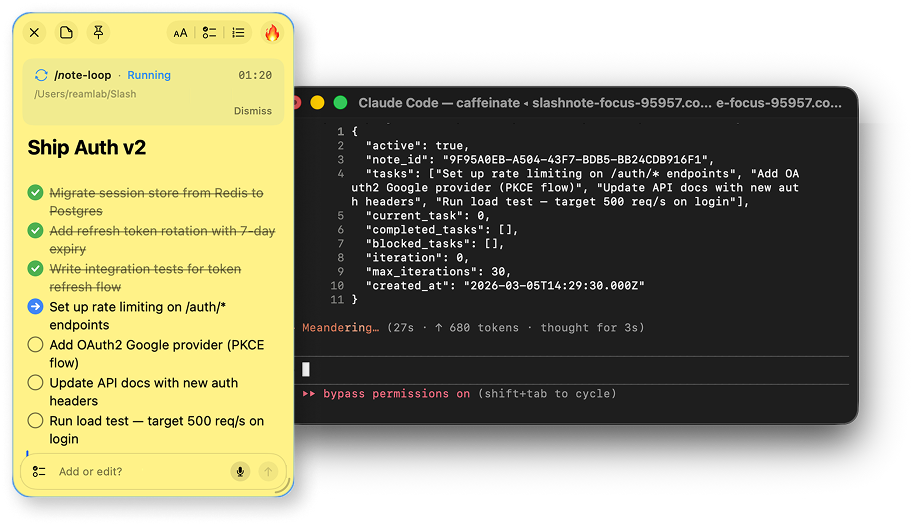
/note-loop
Run Now or Schedule for Later
Type /note-loop and Claude works through your checklist automatically. Each task gets executed, checked off in SlashNote, and the next one starts — hands-free.
- Auto-executes tasks one by one with progress tracking
- 3 attempts per task before marking as blocked
-
/note-loop pausestops at any time,/note-loopresumes - Real-time progress chart on the pinned note
Voice Input — 100% Local
100% on-device. No audio leaves your Mac.
100% On-Device
Runs entirely on Apple Neural Engine. Zero network requests.
100+ Languages
Automatic language detection. Speak in any language.
Push-to-Talk
Hold your customizable hotkey for instant voice notes. Release to save.
Privacy by Design
Your notes are yours. No cloud required.
Local Storage
All notes stored on your Mac. No cloud sync, no servers.
Local Voice
Speech is processed on-device. No audio is sent anywhere.
Optional AI
AI features are opt-in. Cloud AI sends only prompt text, notes stay on your Mac.
Simple Pricing
Free
Everything you need to get started.
- ✓ Unlimited notes
- ✓ A few AI requests/day
- ✓ Rich text editor
- ✓ 6 note colors
- ✓ Pin over all windows
- ✓ Drag & right-click creation
- ✓ Global keyboard shortcut
Pro Monthly
Full power for serious users.
- ✓ All Free features
- ✓ 10x AI requests
- ✓ Voice input (on-device)
- ✓ AI Voice Notes
- ✓ MCP server (20 tools)
- ✓ Shake gesture capture
- ✓ Emoji tags
Pro Yearly
Full power for serious users.
- ✓ All Free features
- ✓ 10x AI requests
- ✓ Voice input (on-device)
- ✓ AI Voice Notes
- ✓ MCP server (20 tools)
- ✓ Shake gesture capture
- ✓ Emoji tags
Free
Everything you need to get started.
- ✓ Unlimited notes
- ✓ A few AI requests/day
- ✓ Rich text editor
- ✓ 6 note colors
- ✓ Pin over all windows
- ✓ Drag & right-click creation
- ✓ Global keyboard shortcut
Lifetime DEV
Pay once, use forever.
- ✓ Everything in Pro (except AI boost)
- ✓ BYOM Provider
- ✓ /note-loop
- ✓ Claude Code Plugin
- ✓ All future updates
- ✓ One-time payment
Frequently Asked Questions
SlashNote is free to download from the Mac App Store. The free tier includes unlimited notes and a few AI requests per day. Pro plans unlock voice input, MCP server, and 10x more AI requests.
SlashNote requires macOS 14 (Sonoma) or later. It runs natively on both Apple Silicon and Intel Macs.
SlashNote offers multiple ways to create notes: drag from the menu bar icon, right-click the icon, customizable global keyboard shortcut, voice note with customizable hotkey (Pro), or shake gesture while dragging content (Pro).
Yes. All notes are stored locally on your Mac. Voice input is processed 100% on-device — no audio is sent to any server. AI features are optional — the default /note Cloud provider uses anonymous auth, and Pro users can bring their own API keys for Replicate or Anthropic.
SlashNote includes an MCP (Model Context Protocol) server that lets AI assistants like Claude Desktop, Claude Code, and Cursor read, create, edit, and search your notes. It includes 20 tools and 6 prompt templates.
SlashNote lives in your menu bar for instant access — no app switching needed. It offers 6 unique ways to create notes, built-in AI assistant, MCP server for AI agents, and local voice input. Capture ideas in 1 second instead of 10+.